

Smarty Men Jacket Photo Editor
One Logix Studio
If you want to see how a different jacket, hairstyle, or beard might suit you before changing your look, Smarty Men Jacket Photo Editor is a simple place to experiment. I approached it as a quick beauty app rather than a serious photo-editing suite, and that distinction matters: its value is in trying visual ideas with minimal effort, not in producing a perfectly realistic professional portrait every time.
The app comes from One Logix Studio and is free to install, with optional in-app purchases ranging from $1.99 to $69.99 per item. It is aimed at everyone, runs on Android 7.0 and newer, and its current version is 2.6.6. The wider appeal is easy to understand: instead of visiting a barber, shopping for jackets, or opening a complicated editor, you can start with a selfie and make a fast mock-up.
My first impression was that the app works best when I treat it as a visual decision tool. I can use it to narrow down a beard shape, compare a few masculine outfit ideas, or create a playful image for sharing. I would not use it as the final judge of how a style will look in real life, because overlays and automatic background removal can never fully reproduce fabric, hair texture, lighting, or the way a jacket actually fits.
From first selfie to a useful style preview
What to expect before you begin
The name suggests a jacket-focused editor, but the experience reaches beyond jackets. The main concept combines men’s hairstyles, beard styles, jacket designs, and a background-removal tool. That combination makes it more flexible than an app that only adds a mustache or only changes clothing, although the results depend heavily on the photograph you choose.
I recommend starting with a clear, front-facing image. A photo with your face visible, reasonable lighting, and enough space around your head and shoulders gives the editor a much better chance of placing the visual elements convincingly. A heavily angled selfie, a face partly hidden by sunglasses, or a crowded background makes the result harder to judge. This is not a minor detail: the quality of the starting photo often matters more than the choice between two similar styles.
Latest News

Uber Eats Under Pressure: What Happens When Delivery Goes Wrong

How QR & Barcode Scanner Adapts to Android and iOS Innovations

Why Waze Navigation & Live Traffic Is Your Essential Travel Companion

CapCut Mastery: Unleash Hidden Features for Pro-Level Editing

How OS Updates Enhance Roblox Adventures

Teacher Simulator: Exam Time Turns Quick Classroom Judgments into a Repetitive Loop
The app is best understood as a collection of visual try-ons. You select a look, inspect how it sits on your image, and decide whether the general direction is interesting. The result may be amusing, useful, or surprisingly persuasive, but it remains a photo composition. If you need accurate sizing, exact color matching, or a realistic preview of a garment’s cut, a clothing retailer’s fitting tool or an in-person fitting will be a better alternative.
Its average rating is 3.5 from around 14 thousand ratings, while the app has passed 10 million installs. I read that combination as a sign of broad curiosity with mixed expectations. Many people can get a quick result, but not everyone will find the placement or realism consistent. That is why I suggest using it with a playful, exploratory mindset instead of expecting a salon-grade makeover.
Setting up the first image without wasting time
After installing, I would avoid beginning with the most important photograph in your gallery. Choose an ordinary selfie first and use it to learn how the editor handles your face and shoulders. This small step makes the experience less frustrating because you can discover the controls without feeling that you are ruining a carefully chosen portrait.
Gallery
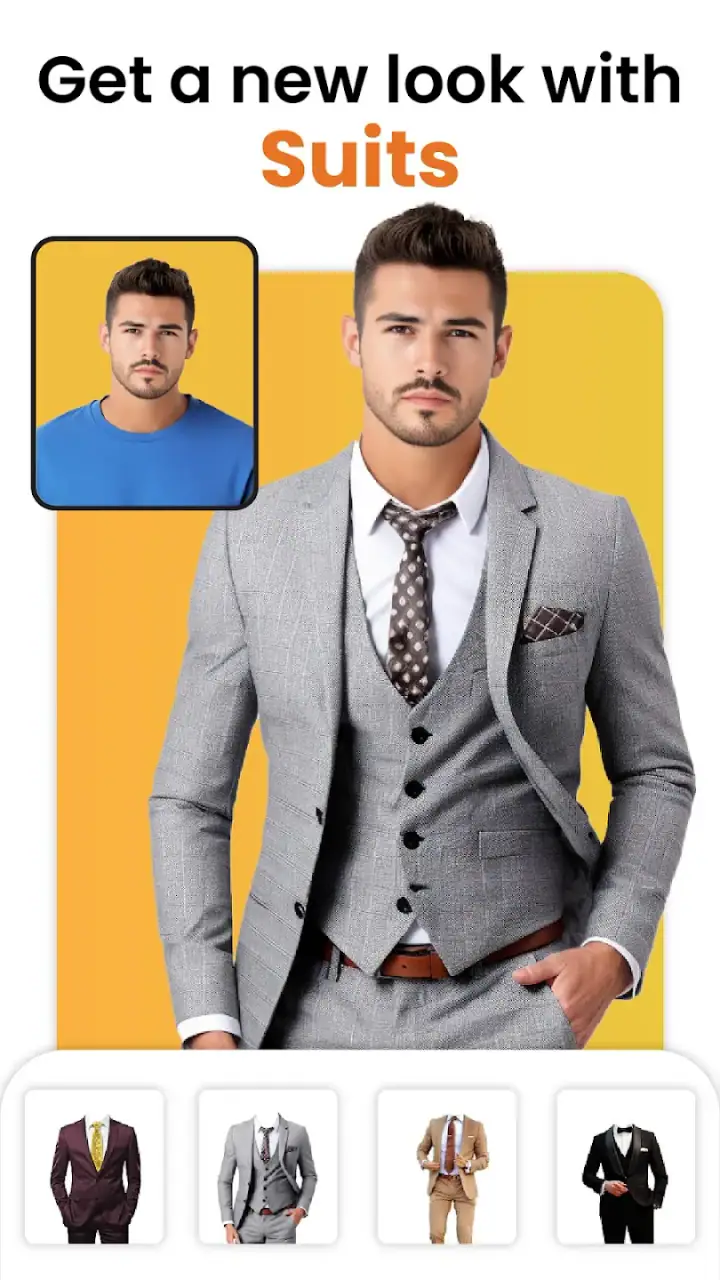
When selecting an image, look for even light on the face. Strong shadows can make the edges of a beard overlay look more obvious, while bright light behind you can make background removal less clean. A plain wall or uncluttered room is preferable to a busy scene. If you only have a complicated photo, cropping closer to the head and upper body can still help you evaluate hairstyles and facial hair, even if it leaves less room for jacket designs.
One useful workflow is to decide what you are testing before you open the style options. If the real question is “Would a shorter beard suit me?”, begin with beard choices and ignore jackets until you have an answer. If you are preparing for a new profile photo, test the overall silhouette first. Browsing every category immediately can turn a focused decision into a pile of random edits.
The background-removal option deserves particular attention. It can make a portrait feel cleaner and help the added jacket stand out, but it should be treated as a presentation aid rather than a guarantee of perfect cutouts. Hair strands, ears, collars, and dark clothing can be difficult boundaries for automatic tools. I get more useful results when I inspect the edges at normal size instead of judging only the thumbnail.
How to reach the first meaningful result
For a first success, I would use a front-facing photo with the shoulders visible, choose one moderate hairstyle, and then add a beard that follows the existing angle of the face. The goal is not to create a dramatic transformation immediately. It is to produce one image where the placement is clear enough to answer a practical question, such as whether facial hair makes the face appear more balanced.
Start with the least extreme option in each group. Very large hairstyles, unusually shaped beards, or strongly stylized jackets can make alignment problems look worse than they are. Once you understand how the app positions the elements, you can try bolder choices. This gradual approach also helps you separate a style you genuinely like from an effect that is merely eye-catching.
When comparing two looks, keep the same original photo. Changing the photograph at the same time as the hairstyle or jacket makes the comparison unreliable because lighting and head position influence your impression. I would save or note the preferred version only after viewing both options at the same scale. A look that seems excellent in a tiny preview may feel less convincing when inspected closely.
There is also a practical reason to test one element at a time. If you change the hair, beard, jacket, and background together, you may not know which part made the image feel wrong. Testing separately turns the app into a small decision process: first face framing, then facial hair, then clothing, and finally the background. That order reduces visual noise and makes the result easier to discuss with a barber or friend.
A realistic everyday use case
Imagine that I am planning a haircut before a weekend event. I could take a well-lit photo, try a few hairstyles, and compare them with my current beard. The app cannot tell me whether the hairstyle will behave the same way with my actual hair thickness, but it can reveal whether I prefer a cleaner outline, more volume, or a different balance around the forehead. I might then show the most useful preview to my barber as a conversation starter rather than as an exact instruction.
The same process works for a jacket decision. If I am unsure whether a formal-looking style or a casual design fits the image I want, I can place both on the same portrait. The comparison may help me choose the mood of a profile picture or decide what kind of outfit to look for in a shop. It is especially handy when I want a quick opinion but do not want to spend time building a full composition in a desktop editor.
For social images, the background remover can make the portrait feel more deliberate. A plain or simplified background puts attention on the face and clothing concept. However, I would check the outline around the hair and shoulders before sharing. Small cutout mistakes that are invisible while editing can become distracting once someone views the image at full size.
Where first-time users may become confused
The biggest source of confusion is the difference between an overlay and a true transformation. A jacket graphic does not measure your shoulders or recreate the folds of fabric around your body. A beard graphic does not change the underlying skin, jawline, or lighting. If the image looks slightly “stuck on,” that is a limitation of this type of editor, not necessarily a sign that you chose the wrong style.
Alignment can also be misleading. A hairstyle may appear acceptable when the face is centered but less natural when the head is tilted. Likewise, a beard can look too high or too low if the original portrait has an unusual camera angle. Before rejecting a style, try a better-matched photograph. Before blaming the photograph, compare a simpler design. Those two checks usually reveal whether the issue is the source image or the selected effect.
Another point worth remembering is that background removal can change the mood of the entire result. A clean cutout may make a casual selfie appear more like a studio portrait, while an imperfect edge can make the jacket and hair look less believable. I prefer to use it after choosing the main look, not before. Otherwise, I can become distracted by the background and overlook whether the actual style suits me.
Because the app is free but includes optional purchases, I would also pay attention to which choices are immediately available and which may require an in-app purchase. The purchase range extends from $1.99 to $69.99 per item, so I would review the prompt carefully before confirming anything. A free download is useful for testing the basic experience, but it should not be confused with every possible style being included at no cost.
How it compares with familiar alternatives
Compared with a general photo editor, this app is quicker for a narrow task. I do not need to manually cut out a jacket, search for a beard image, or learn layers and masks just to answer a simple style question. That convenience is its strongest advantage. Someone who wants a fast visual experiment will probably reach a first result sooner here than in a full editing application.
A general editor remains better when I need precise control. If I want to adjust shadows, reshape an image carefully, blend edges, or create a polished composite, a layer-based tool offers more control than a preset-driven beauty app. The trade-off is time and complexity. Smarty Men Jacket Photo Editor is useful when speed matters more than exactness.
It also differs from virtual try-on tools tied to clothing stores. Those services may be more relevant when I am choosing a specific product, color, or size. This app is broader and more playful because it combines clothing ideas with hair and beard changes, but it is less suitable for deciding whether a real jacket will fit my body. I see it as an early-stage inspiration tool, not a substitute for product photography or trying clothes on.
Against dedicated beard or hairstyle applications, its appeal is the combined workflow. I can consider several parts of my appearance in one place instead of switching between separate tools. The compromise is that a specialist app may offer more depth in its one area. If my only goal is detailed beard design, I would compare the results with a focused beard editor before making a final decision.
Small techniques that improve the result
My first tip is to keep the camera height close to eye level. A photo taken from below changes the apparent jawline and makes facial-hair placement harder to judge, while a high angle can make the face look shorter. This does not require special equipment; simply holding the phone more evenly can produce a more useful comparison.
My second tip is to test the jacket against a portrait where the shoulders are not hidden by a scarf, bag, or raised arm. Even if the app can place a design over the image, the underlying pose may contradict the shape of the jacket. A relaxed, centered pose gives the overlay a fairer chance and makes the final image easier to interpret.
My third tip is to use the app as a conversation aid. If I am uncertain about a beard or haircut, I would prepare two or three restrained versions and ask someone whose taste I trust. I would avoid sending a whole gallery of exaggerated edits because that creates noise rather than useful feedback. A small, consistent comparison is more informative than a collection of unrelated effects.
A fourth useful habit is to judge the image at the point where I will actually use it. If the result is for a small profile image, the overall outline may matter most. If it is for a larger post, edge quality and facial alignment become more important. The same edit can be acceptable at a small size and distracting when enlarged, so the intended destination should guide how much time I spend refining it.
Who will enjoy it, and who should skip it
I think this app suits first-time users who want an uncomplicated way to explore men’s appearance ideas. It is also a good fit for someone preparing a profile photo, collecting inspiration before a haircut, or making a lighthearted image for friends. The broad combination of hair, beard, jacket, and background tools gives casual users more to try than a single-purpose filter.
I would be more cautious about recommending it to anyone who needs reliable realism. Professional photographers, stylists seeking accurate client previews, and shoppers trying to predict the fit of a specific garment will likely want more controlled software or a real fitting experience. The app can support those conversations, but it should not be treated as evidence that a particular cut or jacket will look identical in person.
It may also be a poor match if you dislike experimenting with preset visuals or if you expect every image to align perfectly without selecting a suitable source photo. The app saves time compared with manual editing, but it does not remove the need for judgment. Choosing the right portrait, comparing styles consistently, and checking the edges are still part of getting a worthwhile result.
What to do after the first successful edit
Once I have one convincing preview, I would stop browsing randomly and build a small comparison set. I might keep a current look, a conservative change, and a more noticeable change. This makes the app more useful because I am no longer asking whether an isolated effect looks interesting; I am deciding which direction feels most natural for a real situation.
For a haircut, I would take the preferred image to a barber as visual reference while explaining what I like about it. For clothing, I would use the jacket preview to guide a real-world search for similar shapes rather than assuming the digital design is an exact product. For a social portrait, I would inspect the background and facial edges one last time before sharing.
The developer, One Logix Studio, has positioned this as an accessible beauty app rather than a technical editing workstation. Its Everyone age rating supports that approachable character, and its release on January 22, 2021, gives it a few years of presence on mobile devices. I would still check that the phone meets the Android 7.0 minimum and that the installed build is current, especially if an editing action behaves unexpectedly.
In the end, I find Smarty Men Jacket Photo Editor worthwhile when I use it for quick, low-pressure style exploration. It helps me move from “I wonder what this would look like” to a visual answer without learning complex editing techniques. Its best result is not a perfect illusion, but a clearer decision about what I want to try next. If that is your goal, the free starting point makes sense. If you need exact garment fitting, professional retouching, or consistently natural composites, I would choose a more specialized alternative and treat this app as inspiration rather than the final authority.
FAQs for Smarty Men Jacket Photo Editor
What is Smarty Men Jacket Photo Editor?
Smarty Men Jacket Photo Editor is a creative app that allows users to virtually try on a wide variety of stylish jackets. With a user-friendly interface, it enables users to enhance their photos by adding realistic jacket overlays. Whether you’re looking to experiment with new styles or find the perfect look, this app offers a fun and easy way to do so.
Is Smarty Men Jacket Photo Editor free to use?
Yes, Smarty Men Jacket Photo Editor is free to download and use. However, it may offer in-app purchases for additional features, like premium jackets or ad-free experiences. Users can enjoy the basic features without any cost, but premium options enhance the editing experience.
What features does Smarty Men Jacket Photo Editor offer?
The app offers a range of features including a large selection of jacket styles, customizable photo editing tools, and the ability to adjust size and position for a perfect fit. Users can also add text, filters, and effects to their photos, making it a versatile tool for creating unique images.
Is Smarty Men Jacket Photo Editor compatible with all devices?
Smarty Men Jacket Photo Editor is compatible with most Android and iOS devices. However, users should ensure their device meets the app's minimum operating system requirements for optimal performance. It's important to check the app's page for specific compatibility details before downloading.
How can I ensure my photos look realistic with the app?
To achieve the most realistic results, use high-quality photos with good lighting. The app provides tools to adjust the jacket’s size, angle, and position to fit seamlessly. Taking time to fine-tune these settings will enhance the overall appearance and integration of the jacket into your photo.
Pros
- User-friendly interface for easy editing.
- Wide variety of jacket styles available.
- High-quality image output.
- Quick sharing options to social media.
- No watermark on final images.
Cons
- Limited free features without purchase.
- In-app ads can be intrusive.
- Requires internet for full access.
- Some styles need improvement.
- Occasional app crashes reported.


